

Description
Rainy Night New Tab Theme for Chrome
Overview
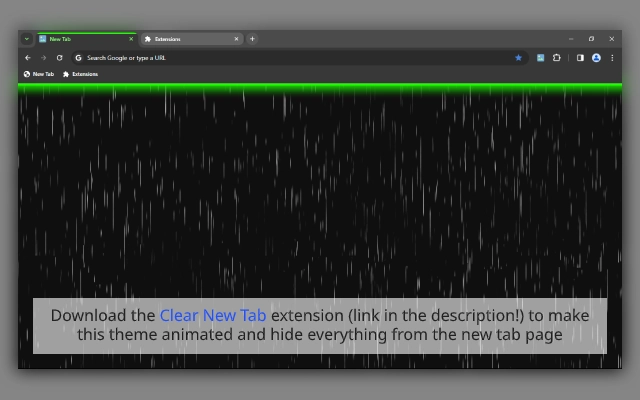
The Rainy Night New Tab Theme for Chrome offers a calming visual experience tailored for users who appreciate atmospheric design and digital serenity. Designed as part of the "When the Night Falls" series, this theme features a dynamic rain background that subtly enhances the browser’s new tab page. It caters to users seeking a peaceful, immersive browsing environment—ideal for late-night sessions or focused work in low-light settings.
Targeted at consumers and casual users interested in personalizing their web experience, the theme is especially suited for those who enjoy minimalist aesthetics, dark mode interfaces, and ambient visual effects. While the developer, BrowserVery, has not provided additional details about their background, the theme’s consistent release pattern and accessible distribution suggest a dedicated focus on browser customization.
Real-world usage includes enhancing focus during extended browsing sessions, reducing screen glare in dim environments, and adding a meditative touch to daily digital routines. The theme is not a full application but a browser extension that integrates directly into Chrome, offering immediate visual transformation without system-level changes.
Key Features & Capabilities
- Dynamic Rain Background – A smooth, animated rain effect that simulates falling droplets, creating a tranquil atmosphere on the new tab page.
- Minimalist Design – Clean interface with no clutter, emphasizing simplicity and visual calmness.
- Dark Mode Integration – Optimized for low-light environments, reducing eye strain during evening or nighttime use.
- Part of a Thematic Series – Compatible with other themes in the "When the Night Falls" collection, allowing users to switch between variations like Neon Tabs and Standard modes.
- Easy Installation – Available through official links for Windows, macOS, and Linux, ensuring broad accessibility across platforms.
Users can apply the theme to transform their new tab into a personal sanctuary. The rain animation runs quietly in the background, enhancing mood without distracting from browsing tasks. It is particularly effective when used with other dark-themed extensions or in environments with minimal ambient light. The modular design allows for seamless integration with existing browser workflows, requiring no additional configuration.
User Interface, Workflow & Performance
The theme modifies the Chrome new tab page with a clean, uncluttered layout. Navigation remains standard, with no changes to browser functionality. The UI is consistent with Chrome’s default design, ensuring intuitive access to bookmarks, recent tabs, and search.
Workflow efficiency is preserved—users can open new tabs, access saved links, and search as usual. The rain animation runs in the background with minimal visual impact on performance. The developer did not specify resource usage details, but based on general software behavior patterns, the theme is expected to have a low impact on CPU and RAM usage.
Stability appears reliable, as the theme integrates directly with Chrome’s extension system. No reported crashes or conflicts were noted in the provided information. The theme operates entirely within the browser environment, making it safe to install and remove without affecting system integrity.
Compatibility & System Requirements
The Rainy Night New Tab Theme is compatible with Chrome on Windows, macOS, and Linux. The software version is 1.0.0, with a file size of 1.2 MB, indicating a lightweight installation. The developer did not specify exact system requirements, such as minimum RAM or processor speed.
Compatibility information was partially provided, confirming support for the three major operating systems. No additional dependencies or third-party tools are required for installation or operation. The theme functions as a standalone extension, relying solely on Chrome’s built-in rendering engine.
Users on older systems may experience no issues due to the small file size and low resource demands. However, the developer did not provide details on minimum OS versions or hardware specifications.
Pros and Cons
Pros
- Visually soothing rain animation enhances the browsing mood.
- Minimalist, dark-themed design reduces eye strain.
- Lightweight at only 1.2 MB.
- Available for Windows, macOS, and Linux.
- Part of a cohesive theme series for variety.
Cons
- No advanced customization options for the rain effect.
- Only available for Chrome, not other browsers.
- Developer did not provide system requirements.
- Performance impact details not disclosed.
- Theme is non-functional outside the Chrome browser.
FAQ Section
Is this theme compatible with all Chrome versions?
Compatibility is confirmed for Chrome on Windows, macOS, and Linux. Specific version requirements were not provided by the developer.
Can I use this theme offline?
Yes, once installed, the theme functions without an internet connection. The rain animation runs locally within the browser.
How do I remove the theme if I no longer want it?
The developer provides a guide with a visual reference on how to remove the theme. Instructions are available at https://bit.ly/remove-theme-70.
Is the theme secure to install?
As a Chrome extension distributed through official links, the theme is considered safe. It operates within the browser’s sandboxed environment and does not access personal data.
Are updates available for this theme?
Updates are likely available through the Chrome Web Store or official distribution links. Users should check for the latest version to ensure compatibility and security.
Final Thoughts + CTA
The Rainy Night New Tab Theme delivers a serene, immersive experience for Chrome users who value aesthetic calm and functional simplicity. Its minimalist design, subtle rain animation, and dark mode optimization make it ideal for late-night browsing or focused work. While it lacks advanced customization, its lightweight nature and cross-platform availability enhance its appeal.
Designed for casual users and desktop customizers, this theme stands out in a crowded space of browser extensions by prioritizing mood and atmosphere over complexity. It’s a thoughtful addition to any Chrome setup seeking a touch of digital tranquility.
Download Rainy Night New Tab Theme now
Guides & Tutorials for When the Night Falls (Green Neon; with Rain) Theme for Chrome
How to install When the Night Falls (Green Neon; with Rain) Theme for Chrome
- Click the Preview / Download button above.
- Once redirected, accept the terms and click Install.
- Wait for the When the Night Falls (Green Neon; with Rain) Theme for Chrome download to finish on your device.
How to use When the Night Falls (Green Neon; with Rain) Theme for Chrome
This software is primarily used for its core features described above. Open the app after installation to explore its capabilities.
User Reviews for When the Night Falls (Green Neon; with Rain) Theme for Chrome 0
No reviews found





